
Is this not the next generation of Apple application design?
Is this not the next generation of Apple application design?
 Matt drops a link to Khaled’s announcement about Shuttle, a long-term project to overhaul the WordPress admin UI.
Looking it over (and as someone who participated from afar some time ago) I have to say that I actually prefer Steve Smith’s WP Tiger Admin. I use it on this blog and love it. There are a few glitches here and there, but for the most part it’s a huge improvement over WordPress’ old school default.
In any case, it’s great to see such major changes coming to WordPress — I just hope that it maintains the original simplicity that makes WordPress so widely successful.
Huh. Well, I was going to post this:
If Yahoo! were to acquire JOT I bet it would be Alex Russell and his dojo… given that they’re working on a very slick open source AJAX UI library (that’s now in its second beta release).
But then I just read that Alex has left JOT to work fulltime on Dojo! Whoa!
Well, guess that could explain why the acquisition didn’t happen, eh? 😉
 Only 37 betas later, Brent Simmons, now of NewsGator, has released the next dot-release of the Mac’s best feed reader, NetNewsWire.
I’ve been using all the betas and love it just as much as ever — totally solid feed reading. Would love to see support for microformats like Endo but there’s always 2.2…

So I’ve been doing some work with Palo Alto-based startup Mozes for the past month or so and it’s exciting to see that work beginning to trickle out, first at Maker Faire and now AlwaysOn Hollywood (check out 19:19-26:00 in this video). It’s funny, but apparently I’m a “presentation” guy too — meaning that, yeah sure, I do interface and experience design, but I also do presentation prep. Guess it just comes from the “communications” part of my training. (Oh, and some pop trivia for you: the first work I did for Mozes was unpaid, happened at ETECH and turned into the design they used for their Maker Faire shirts).
Anyway, I just wanted to put out there how cool this stuff is. I mean — disclosure: I’m paid to help Mozes improve their product and get the word out — but that’s not why I write about things. Nor why I’m writing about Mozes. Nor why I’m working for them (though reconciling what else I have of value that would help me pay the bills still eludes me).
I actually really like their tech — and I think they’re eager to make this the best, coolest platform for leveraging the nexus of the SMS-Web.
 Don’t believe me? Ok, smarty pants — try it: text hellsyeah to 66937 (aka Mozes on the keypad). You should get not only get back a text message, but you’ll also have some links and other goodies stored online for you to retrieve at your leisure.
Guess how long it took me to set that up? 24 seconds. The stupid icon took me longer than inputting what I wanted for the response.
“Yeah, neat, big deal” you say? Well, ok, tonight only, try this: text dj? followed by a number 0-201 — or choose from this list. What will it do? It’ll change the currently playing that the Mozes folks are listening to at their Cinco de Mayo party!
How is that possible? Well, for every keyword that you create (go sign up now and get your own free keyword), you can shunt the data off to your own open API and have the data returned to Mozes. That means that you can pipe dynamic data from your super-hyped up Web Two Dot Oh app back to any SMS device via a simple keyword on Mozes’ system.
This is just the beginning — and I’m terribly jazzed about pushing this platform forward. In fact, I want to know what you want to do with this thing. I mean, I gave you one example — another is to text a radio station like ‘kroq’ to Mozes to get the currently playing song information… But I’m more interested in what you want to do with this thing. I’ve got plenty of ideas, but none are likely as good as yours. So tell me, whatcha whatcha whaaatcha want, whatchawant?

No less two months after I brought my PowerBook G4 in to get the trackpad, power input and white spots fixed, not only are the effing white spots back but the lower RAM slot is b0rked.
You know what the means.
My precious two jiggabites of humina humina memory have been slashed in half like the rainforests that were destroyed as a result of Apple’s poor environmental record.
So it need not be said that Tiger’s speed isn’t so speedy anymore; in fact, its moves more resemble a sloth with a limp. But I digress.
This is apparently a “common problem” according the Mac Genius who took my repair details down — notably the same one that I talked to two months ago when I had my other issues. And it’s also apparently the reason that my PowerBook doesn’t sleep when I tell it to — coming alive like some “Sorry, Dave I can’t do that” somnamulbot when I tuck it away in my fraying Timbuk2 bag.
Man I’m a mess.
Anyway, here’s what I need some advice on… I happen to have another PowerBook G4… the previous model — that works fine. All I want to do is copy over my system verbatim to the old and pick up from where I’m leaving off from my current system so that I can ship this puppy off to Apple to get repaired. This shouldn’t be that hard, should it?
Anyway, I left Synk (an rsync wrapper) running for 8 hours last night but after encounteringo only 5 minor errors, wasn’t able to produce a bootable clone machine… I’m sure the data’s there, but a key component here is zero downtime when switching over — I just want to swap the data from one system to another and keep going!
I’ve tried Bombich’s Carbon Copy Cloner in the past but had a similarly sticky time — having it crash midway through a backup.
Is there any simple way to do this?! Preferably with a GUI? I mean, I could try to just take out the whole harddrive and deposit it in the other, but I’ve never done that… would you recommend that route for a fairly savvy hardware dude?
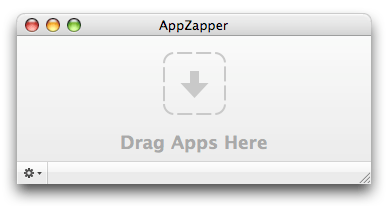
There’s an interesting new class of apps emerging that help you successfully uninstall applications on the Mac. You wouldn’t think that this would be such a difficult matter (just drag them from you Applications folder to the trash, right?) but indeed it is — and apps that you install and run even once can leave a host of breadcrumbs behind to clutter your system.
It’s hard to tell which apps are in the “me too” category or whether it’s just the collective unconscious at work again, but head and shoulders above the rest is a simple app called AppZapper — who’s simple, intuitive and amusing interface just works. Also love the site design and the fact you get 5 “zaps” before you have to register. (Use coupon code “pomcast” for $3 off!).
Similar in appearance to AppZapper, you’ve got Yank — “an all-purpose uninstaller for Mac OS X.” With Yank, you create Uninstaller “yankfiles” during app installation to make uninstallation easier. Definitely for the forward thinking and thick of wallet — as it retails for $20. Bonus: YankFiles filesharing… didn’t have Yank when you installed that app? Maybe someone else did and uploaded their yankfile for it!
In the also-ran category, we’ve got SuperPop with a much heavier interface that first scans all your applications and allows you to pick from a list and CleanApp — much maligned for seemingly stealing AppZapper’s UI, it’s a mere $2.95 cheaper and allows you five free uninstalls as well.
. . .
In other news, Flock’s released 0.5.15, folding in security updates from Firefox 1.5.0.3.
After the WiFi ban, it’s not surprising that certain profs have begun banning laptops in the classroom. Genius! I imagine that, to be fair, pens, paper and pencils will not be far off. Up next: metal detectors in the class for the sake of education — not safety!
Ryanne and Jay make an appearance in the Chron after a sweet mention in Wired… Keep it up guys!

According to VP of Engineering Mark Towfiq, Flock has apparently found a new Director of User Experience… a fella named Will Tschumy. On first glance, I can’t seem to produce a Google Resume for him but I’m eager to find out more about him!
While I’m on the topic of Flock, I have to admit that the latest hourlies of Flock’s upcoming public beta (dubbed Cardinal) are starting to looking really pretty thanks to Bryan Bell (and not ironically reminiscent of his other project, NetNewsWire). So, here’s a brief review (based on Milestone 4).
Continue reading “Who is Will Tschumy? Plus: Cardinal Pre-review”
 Factory Joe